


Download Adblock Pro – Fast, Free, Secure Ad‑Blocking Extension
Overview
In today’s web landscape, intrusive advertisements can turn a simple browsing session into a frustrating experience. Adblock Pro steps in as a powerful, free browser plugin designed specifically for Google Chrome users who want a cleaner, faster, and more secure online environment. Built on a robust filter‑list system, Adblock Pro automatically detects and removes banners, pop‑ups, video pre‑rolls, and sponsored content across a wide range of sites—including Facebook, YouTube, Google Search, Gmail, and virtually any other webpage you visit.
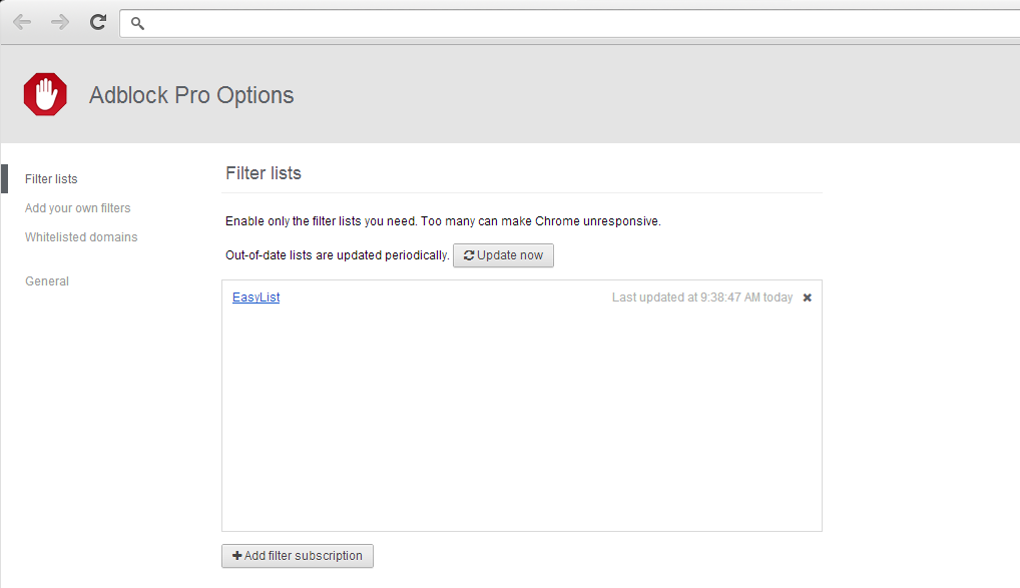
By default, the extension selects the filter set that matches your browser language, ensuring optimal blocking out‑of‑the‑box. For power users, the tool offers a customizable whitelist and the ability to craft personalized filter rules, giving you granular control over what gets blocked and what stays visible. While the extension’s memory footprint is slightly higher than some ultra‑light alternatives, the trade‑off is a consistently ad‑free experience that doesn’t compromise on speed or reliability.
Whether you’re a casual surfer tired of endless pop‑ups or a digital marketer needing precise control over ad exposure, Adblock Pro delivers on its promise: a smoother, distraction‑free web journey.
Key Features & Capabilities
- 13 Built‑In Filter Lists – Includes global, regional, and language‑specific filters (Italian included) for comprehensive coverage.
- One‑Click Whitelisting – Instantly allow ads on a per‑site basis directly from the extension icon.
- Custom Filter Creation – Advanced users can write their own filter rules to block niche or emerging ad formats.
- Intuitive Italian UI – The settings menu is fully localized, making configuration straightforward for Italian‑speaking users.
- Real‑Time Blocking – Ads are removed as the page loads, preventing visual clutter and reducing bandwidth usage.
- Social Media Support – Effectively blocks sidebar and feed ads on Facebook, Instagram, and LinkedIn.
- YouTube Ad Suppression – Eliminates pre‑roll, mid‑roll, and overlay video ads without breaking playback.
- Low‑Maintenance Updates – Automatic filter list updates keep the extension effective against new ad techniques.
- Secure Browsing – By removing malicious ad scripts, it adds an extra layer of protection against drive‑by infections.
- Lightweight UI – The icon sits next to the address bar, providing instant access without overwhelming the toolbar.
Installation, Configuration & Compatibility
Getting started with Adblock Pro is a breeze. Follow these steps to install and configure the extension on your Chrome browser:
- Open Google Chrome and navigate to the Chrome Web Store.
- Search for “Adblock Pro” and click the Add to Chrome button.
- A confirmation dialog appears—select Add extension. The plugin downloads and automatically appears as an icon beside the address bar.
- Click the Adblock Pro icon to open the quick‑menu. From here you can Enable/Disable blocking for the current site, Access Settings, or Create a New Filter.
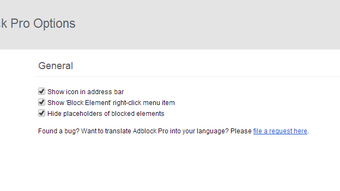
- To fine‑tune the experience, open the Options page. Here you can:
- Choose which of the 13 filter lists are active.
- Set your preferred language filter (the default matches your browser language).
- Add websites to the whitelist if you want to support certain creators.
- Write custom filter rules using standard Adblock syntax.
- Save changes and refresh any open tabs to apply the new configuration.
Compatibility: Adblock Pro is built for Google Chrome and works seamlessly on all operating systems that support Chrome, including Windows 10/11, macOS Catalina and later, Linux distributions, as well as Chrome on Android and iOS (via the mobile Chrome app). The extension automatically syncs settings across devices when you sign into Chrome, ensuring a consistent ad‑free experience wherever you browse.
Pros and Cons
Pros
- Highly effective at blocking ads across a wide range of websites, including social media and video platforms.
- Easy one‑click whitelisting lets you support sites you trust without diving into menus.
- Custom filter support gives power users full control over blocking rules.
- Automatic filter updates keep protection current without manual effort.
- Italian‑localized interface makes configuration intuitive for native speakers.
Cons
- Memory usage is modestly higher than some ultra‑light ad blockers, which may be noticeable on low‑end devices.
- While the UI is simple, users unfamiliar with filter syntax may find custom rule creation daunting.
- Limited to Chrome; no native version for Firefox, Edge, or Safari (though Chrome extensions can be installed on Chromium‑based browsers).
Frequently Asked Questions
Is Adblock Pro completely free?
Yes, Adblock Pro is a free extension. There are no hidden fees, premium tiers, or subscription requirements. All core features, including the 13 filter lists and custom rule creation, are available at no cost.
Can I use Adblock Pro on mobile browsers?
Adblock Pro works with the Chrome browser on Android and iOS. Install it from the Chrome Web Store on Android or via the Chrome app on iOS, and the same blocking capabilities will apply to mobile web pages.
How does the whitelist feature affect my browsing speed?
Whitelist entries are processed instantly and do not introduce noticeable latency. The extension only bypasses blocking for the listed domains, leaving the rest of the page to load without ad‑related scripts, which often results in faster page rendering overall.
Will Adblock Pro block non‑advertising content by mistake?
The default filter lists are carefully curated to target only advertising and tracking scripts. However, on rare occasions a legitimate element might be misidentified. You can quickly restore it by clicking the “Unblock on this site” option in the extension’s menu.
How often are filter lists updated?
Adblock Pro checks for filter list updates daily. When new rules are released, they are downloaded automatically, ensuring you stay protected against emerging ad formats without manual intervention.
Conclusion & Call to Action
If you’re seeking a reliable, free solution to eradicate intrusive ads while preserving a smooth browsing experience, Adblock Pro stands out as a top contender for Chrome users. Its extensive filter library, intuitive Italian interface, and flexible whitelist/custom filter options strike a balance between ease of use for beginners and depth for power users. Although the extension’s RAM usage is modestly higher than some minimalist blockers, the trade‑off is a consistently clean page load and added security against malicious ad scripts. Install Adblock Pro today, enjoy an ad‑free web, and reclaim valuable time and bandwidth.
Download Adblock Pro now and experience a faster, safer, and more enjoyable internet.
After weeks of daily use, Adblock Pro has proven to be a dependable ad‑blocking companion. The default filters keep most sites clean, while the whitelist lets me support favorite creators without compromising the overall experience. The only minor drawback is a slight increase in memory usage on older laptops, but the performance gain from fewer loaded ads outweighs this concern.







